Ollama AWS Hybrid Deployment
Ollama AWS Hybrid Deployment
Architecture
My current setup runs on a 4U rackmount compute node powered by a Ryzen 9 5900x and RTX 3070ti.
See hardware details in my homelab github repository.
On the cloud side, Open WebUI and Gluetun are deployed together on an EC2 instance. Open WebUI runs from with 'OLLAMA_BASE_URL' and 'WEBUI_SECRET_KEY' set as environment variables, while Gluetun sits alongside it exposing port 3000. In my homelab, Ollama runs in 'host' network mode in a Ubuntu Proxmox VM (exposes the host VM IP at 192.168.1.x:11434, which is what gets passed into the base URL environment variable) with full Nvidia RTX 3070ti passthrough. My workstation's 5080 was used during testing.
The web interface for chatting with the AI models is accessed via a public URL at https://ollama.domain.tld, with authentication handled by both Cloudflare Zero Trust via Google Login and Open WebUI's own login layer.
See the full docker configuration here.
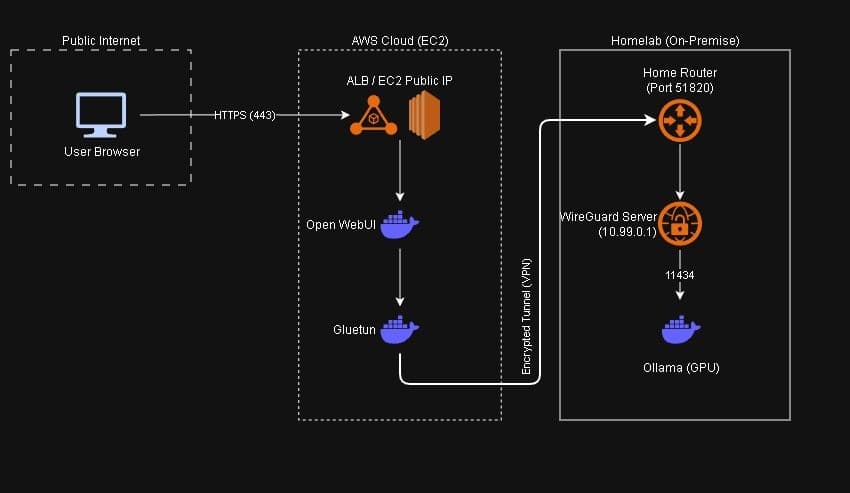
Justification
Before settling on this architecture, I spent some time weighing the tradeoffs between keeping everything on-prem versus moving the frontend to the cloud.
The homelab setup has a few obvious weak points. Reliability, unfortunately, is the biggest one. There are single points of failure at every layer: home network, ISP, hardware, and the fact that I'm the only person operating any of it. Heavy traffic has a real impact on both application and network performance. Security is another consideration. Public-facing infrastructure is currently limited to Cloudflare DDoS protection and Google SSO, there's no centralized logging, and home network security isn't exactly enterprise-grade. Cost is worth a mention too, even if it's pretty negligible at this scale. A Raspberry Pi running the two containers would pull around 3-7 watts depending on load. Virtually nothing, but 24/7 power draw and ongoing maintenance adds up - especially with how hardware prices have been trending lately. Though realistically I'd be running this on a headless Debian VM in Proxmox anyway.
Solution
Moving the frontend to AWS addresses most of those concerns. EC2 gives me a 99% to 99.99% uptime SLA, rapid elasticity, and multiple regions to work with, none of which I can replicate at home. AWS handles physical security, virtualization, and hardware redundancy under the shared responsibility model. Any sensitive context processed by the AI agent gets routed locally through a VPN tunnel rather than touching the cloud, which keeps that data where it should be.
On the resource side, this lets me reserve local compute for workloads that actually need a GPU, things like heavy transcoding and VMs, while the web interface lives in the cloud where it's cheaper to run. There's also the professional development angle; the part that I valued the most. Working with EC2, VPCs, and the rest of the AWS ecosystem is a rewarding experience. I found my familiarity on the command line to come in handy when working with the AWS CLI on the Ubuntu VM. Commands like aws ec2 describe-instances | grep -i combined with whatever I was hunting for ("ip", "public", "dns", "state", etc.) became second nature. After a couple of days I didn't really need the web console to manage the instance anymore.
Complications
The trickiest part of this setup was getting the WireGuard tunnel stable. Open WebUI shares the container network with Gluetun via network_mode: "service:gluetun", so if Gluetun's health check fails, the VPN connection becomes unstable and Open WebUI loses its connection to Ollama. The fix ended up being straightforward but not obvious to me. Any IP used during Gluetun's startup health check MUST be included in 'WIREGUARD_ALLOWED_IPS'. I went with '1.1.1.1/32' in my config, which also conveniently whitelists Cloudflare DNS. Without this, the VPN would continually disconnect and the whole stack would behave unpredictably.
On the local side, Ollama needs to run with network_mode: host so it's reachable via the VM's IP address from the EC2 instance through the tunnel. I don't recall running into firewall issues, but allowing port 11434 from the Ollama server to the WireGuard server (e.g. sudo ufw allow from 192.168.1.100 to any port 11434 proto tcp) is worth keeping in mind.
Future Plans
Down the road I want to connect this setup with future cloud projects as the homelab continues to grow. Terraform and Fargate integration are both on the list once the architecture matures a bit more.